R/ Pharma 2025 · Personal Highlights

The R/ Pharma virtual conference (2025) is focused on the use of R in pharma, encouraging open-source and cross-company collaboration. This year’s hottest topic has been AI and Large Language Models (LLMs) — how they’re being integrated into R and their practical applications in the pharmaceutical industry, from automated slide generation to exploring clinical data using integrated chatbots.
The following section summarises some of the workshops and talks, condensed to their key takeaways. This serves mainly as a repository for links to presentations and workshop materials.
LLM-Powered {gtsummary} for Template Exploration · Davide Garolini, Roche


In clinical/ pharmaceutical trials, analysts create tables, listings, and figures (TLFs) for regulatory submissions, where every number must be verified — a process that often involves complex R scripts and time-consuming manual quality control (QC). Davide Garolini and colleagues developed a proof of concept Shiny app that uses a local (e.g., Ollama) or API-based LLM that helps users see and understand how clinical tables are generated in R. By feeding in an R template (examples from the {Cardinal} package), the app provides step-by-step code explanations and checks for performance, maintenance, and documentation of the code. It’s a great example of how LLMs can support and clarify R workflows in clinical programming. Related packages are {gtsummary}, {cardinal}, and {cards} (see also R/ Medicine 2025).
Practical AI for Data Science · Simon P. Couch, Software Engineer Posit
Simon Couch opened his keynote by highlighting the important contrast between the common narratives we see on LinkedIn — suggesting that data science magically happens with a single prompt — and the messy, nuanced reality of working with AI (“practical AI”), where using LLMs is not only expensive but also often constrained by the sensitivity of the data, and where meaningful analyses demand time, context, and deep domain knowledge. He presented whats currently possible with LLMs in R, focusing on extracting structured data from unstructured content, tool calling, and coding agents:
- Positron: Databot and Positron Assistant.
- RStudio: there’s something bigger in the works in the direction of the Positron assistant, but no further details are shared yet. Simon presented his own experimental coding agent for RStudio, called
side::kick.
Find the slides of the talk here (corresponding GitHub repo).

How to Use Pointplank to Understand, Validate, and Document Your Data · Rich Iannone, Software Engineer Posit
I first heard about the {pointblank} package at the R/ Medicine 2025 conference, but this workshop offered a much deeper dive into its features and practical uses. Pointblank makes it easy to automatically validate, monitor, and document your data — whether in data frames or databases — with flexible validation checks, built-in data dictionaries, and threshold-based alerts. Plus, it can even send regular email reports to keep you up to date on your data’s quality over time.
Find the workshop material here and the package documentation here.
Getting Startet with LLM APIs in R · Sara Altman, Data Science Educator Posit
This workshop introduced the basics of working with large language models (LLMs) in R using the {ellmer} and {shinychat} packages. Additionally it covered prompt engineering, tool calling, and practical applications of LLMs in R. See also Joe Chengs’ workshop at the R/ Medicine 2025 virtual conference.
Most important learnings for me:
- how to get structured outputs from unstructured content, such as text or images
- difference between system and user prompts and how to set them using
{ellmer} - system prompts can be saved in markdown files for reuse and contain dynamic content
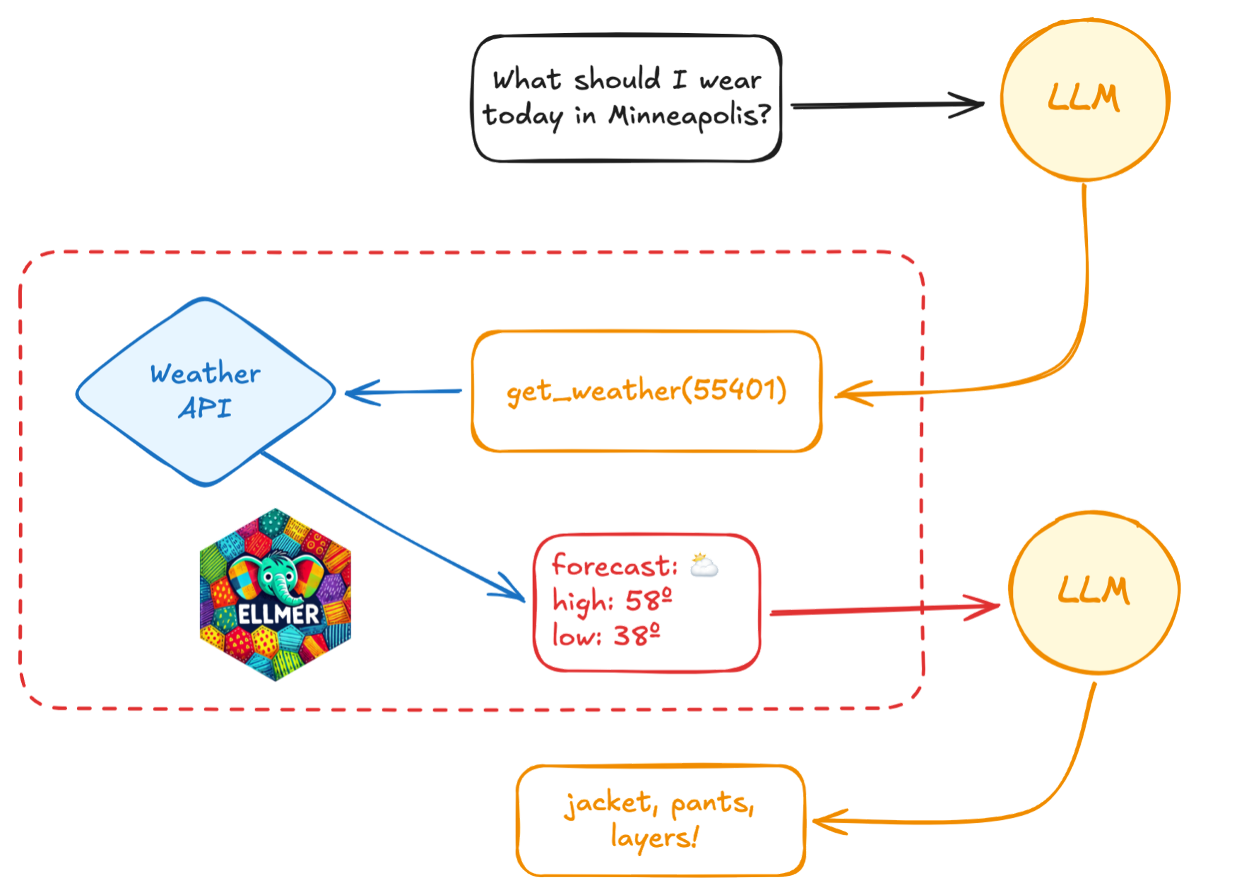
- concept of tool calling (illustration on the right) to bring up-to-date information to LLMs (major limitation of LLMs!)
Find the workshop material here and see the GitHub repository for demos and exercises.
More material & R tools to interact with LLMs mentioned in the workshop:
Posit AI Newsletter; Antropic’s Prompt Engineering Overview; OpenAI Cookbook











Introduction to Building (Better) R packages · Nicola Rennie, Data Visualisation Specialist
The workshop showed how easy it is to build your own R package and that it is not reserved for advanced developers; it can be done in just a few lines of code and can greatly simplify and streamline your daily R workflow - regardless of how many functions you have or how simple they are. Nicola gave a very hands-on workshop on building R packages covering the most important steps to build one from scratch, including writing functions, documenting them, adding tests, and sharing the package with others.
Find the workshop slides here and a summary of the most important commands from the {usethis} and {devtools} package right below.
- Build package
usethis::create_package("package_name")
- edit DESCRIPTION file
- e.g. Title: title corresponds to a very short description of your package
- e.g. define a licence:
usethis::use_mit_license()-> automatically updates your DESCRIPTION file
- Install package
devtools::install()or press Install in the “Build”-tab on top right (only appears in R-package project). So far the commands built the R package and installed and loaded it.
- Add functions
- add a new R script and add your function
- use
devtools::load_all()-> simulates installation, much quicker than installing the package -> useload_all()while developing your R package - good-to-know:
- unfortunately one cannot use subfolders within the
/Rfolder to organize functions, but one can have multiple functions in one script - if a certain function is not available after running
devtools::install(), the function has probably not been exported yet. It is recommended to usedevtools::load_all()while developing a package.
- unfortunately one cannot use subfolders within the
- Write documentation
- Use {roxygen2} package
- helps to write the NAMESPACE file
- add
#' @exporton top of function in your function script- use
devtools::document()> updates NAMESPACE
- use
- different roxygen tags
#' @export: makes function available to users of the package#' @param: describes function argument#' @returns: explains what the function returns#' @examples: shows examples how to use the function
- rerun
devtools::document()> it will add an .Rd file in your/manfolder- rerun
devtools::load_all()> check with?my_functionto see whether the help file was updated!
- rerun
- Use {roxygen2} package
- Tests
- R CMD check: do functions run? Are they documented? > run check in the Build-Tab
- Linting checks: is the code well formatted?
- Unit tests: do functions work as they should?
- CRAN checks: does it work across different systems? Does it not break any other packages?
- In the workshop we only covered R CMD check. It is highly recommended to fix the warnings and errors.
- example error: missing namespacing of package > use
usethis::use_package("stringr")which will add in DESCRIPTION File. Namespacing (package::function) can be used to import, but you could also use roxygen2 with the tag@importFrom stringr-> has the same effect as namespacing!
- Share packages with others
- add your package to CRAN
- install from local copy:
devtools::install_local("package_name") - from GitHub:
devtools::install_github("username/package_name")